Build Instructions

· 3 min read
Andy Schuricht
Documentation Nerd

Generating the Static HTML Site

Files within the structure above can either be viewed on a local development server (generally to test the functionality of the site) or built to HTML and javascript files that can be uploaded and served from a webhost. One of the benefits of Static HTML is that there is no database component, so the files can be sent via FTP to a hosting service and the site just works. Alternaively, and this is something we still need to test, static html files can be added to a Sharepoint site, and then can be accessed by viewing the index.aspx file. Sharepoint will serve the html directly, with no additional hosting required. Details

note

After cloning the repository, you need to run yarn install to create the additional files needed by Docusaurus to function. They’re the ones found in .gitignore in the repository. Yarn 4 is different from prior verions of Yarn and as of 11/2023 is installed after node.js with corepack enable.

Ceres 6

· 4 min read
Andy Schuricht
Documentation Nerd

Ceres 6

tip

Ceres 6 documentation is in progress, and can be temporarily found in the 'next' subdirectory under 'docs'. The entry point is linked here.

Ceres 6 is a complete rewrite of Ceres, and uses a completlely new web-based visual style. This means that nearly every screenshot in the Ceres 5 documentation is obsolete. In previous updates, even if the visual changes were minor, the screenshots were updated alongside a review of the documentation.

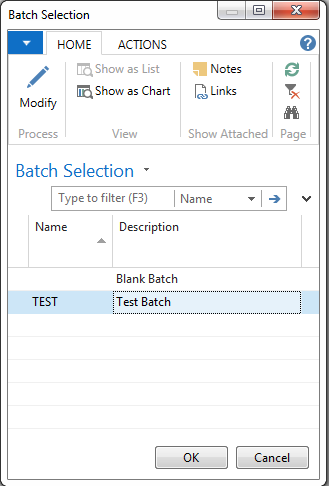
Ceres 4 Screenshot

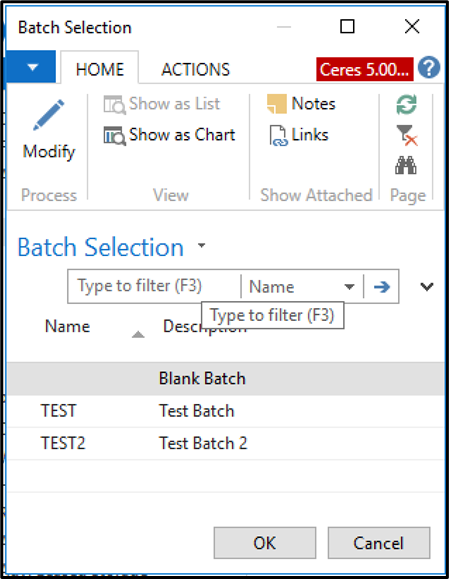
The Ceres 4 image above is nearly identical to the Ceres 5 image below.

Ceres 5 Screenshot

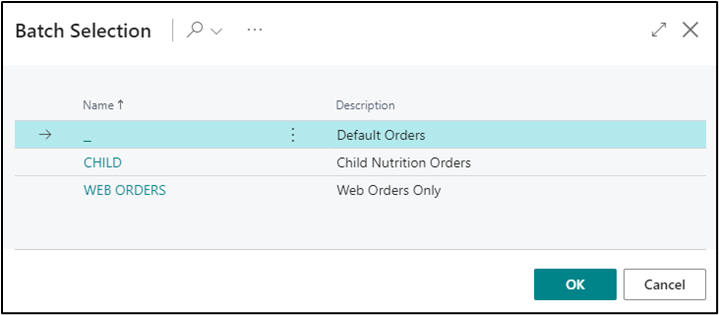
Below is the batch selection screnshot for Ceres 6. It's clear that there is enough difference between Ceres 5 and Ceres 6 that new screenshots should be included.

Ceres 6 Screenshot

Cleanup Tasks

· 6 min read
Andy Schuricht
Documentation Nerd

Many of the links in the related topics sections aren't connected yet - that's an ongoing task. The ones below reference documents that either don't exist or have been updated or renamed.

DocumentationMissing LinkTask
agency-express-job-queue-setupAgency Express Item Validate and Reservation RevisionsFind or Delete
agency-express-managing-web-ordersAgency Express Item Validate and Reservation RevisionsFind or Delete
agency-express-managing-web-ordersAllocated Agency Orders – Update Web Allocation StatusFind or Delete
agency-groups-and-qualifiersAgency Express Item Validate and ReservationFind or Delete
agency-order-overviewAgency Clear BackordersFind or Delete
agency-palletsInventory SetupFind or Delete
agency-questionnairesAgency Questionnaires and Agency Express 3Find or Delete
donation-order-archivingDonation Credit Memo OverviewFind or Delete
donor-change-on-posted-donation-orderDonation Credit MemosFind or Delete
fund-overviewGrant Receiving and ReportingFind or Delete
reason-codes-mandatory-overviewPhysical Inventory Counts and Inventory JournalsExists in C4
reason-codes-mandatory-overviewPhysical Inventory Counts and Whse Inv JournalsExists in C4
year-end-checklistPhysical Inventory Counts and Inventory JournalsFind or Delete
year-end-checklistPhysical Inventory Counts and Whse Inv JournalsFind or Delete
bin-overviewLeased Warehouse OverviewFind or Delete
inventory-short-handlingItem JournalsWhich one(s)?
item-journal-adjusting-quantitiesPhysical Inventory Counts and Inventory JournalExists in C4
item-journal-repack-and-item-reclassPhysical Inventory Counts and Inventory JournalExists in C4
item-journal-suggest-lotsPhysical Inventory Counts and Inventory JournalExists in C4
item-reclass-journal-overviewPhysical Inventory Counts and Inventory JournalExists in C4
location-overviewBranch OverviewFind or Delete
mealconnect-integration-user-guide-and-error-handlingMealConnect Setup and Admin MaterialsFind or Delete
warehouse-activity-plan-and-default-bin-pickingPhysical Inventory Counts and Inventory JournalExists in C4
warehouse-adcs-barcode-processingPhysical Inventory Counts and Inventory JournalsExists in C4
warehouse-adcs-barcode-processingPhysical Inventory Counts and Whse Inv JournalsExists in C4
zone-overviewLeased Warehouse OverviewFind or Delete
quick-access-guideCeres Profile ConfigurationFind or Delete
parent-vendor-overviewBranch OverviewFind or Delete
purchase-requisition-worksheetItem Journal OverviewWhich one(s)?
vendor-overviewRoadnet OverviewFind or Delete

Challenges

· 3 min read
Andy Schuricht
Documentation Nerd

Challenges

Indentation

Some of the existing documentation relies on nested indentation to separate out descriptions of things. For example, in Location Overview, in the Bin Policies FastTab section, the main title and first sentence are against the left margin. The following field descriptions are indented one tab. The Use WAP Suggestion field has options, so the options are indented by two tabs. One of the options, Prompt for Suggestion Handling has two options and a cancel button in the resulting dialog box. These sub-options are indented by three tabs.

Markdown doesn't really do indentation. Workarounds exist, like using inline HTML, JSX and other things, but none of them are particularly intuitive when converting the docs. Each of these workarounds also adds extra time in the document conversion stage.

Some other options

Images

The images in the current Word-based documentation are pasted directly in each document, in line with the text and at various sizes. With each iteration of Ceres, the images in the documents are manually updated to reflect the newer version. Because Word is not desktop publishing software, the images do not require names and can be quickly resized by just dragging corners. This means that all of the images in the current version of the documentation are all different sizes. See the images here for an example. Notice that the main screen image and the batch selection screen image are wildly different resolutions.

Purpose

· 11 min read
Andy Schuricht
Documentation Nerd

Purpose

Documentation

This is to help document what I’ve done to generate the proposed Ceres 6 documentation site. It’s mostly just process notes and will frequently point to documentation elsewhere. It’s very likely that there are more effective ways to do this – this is just what I’ve been doing. For example, I started working in Visual Studio Code to create the markdown files and sync with GitHub, but VS Code may or may not be the best tool for this purpose.

Project

The current Ceres help system consists of dozens of Word documents. There are good historical reasons for this, including (among other things) maintaining the ability of food bank users to download and modify them to reflect their own internal business rules and workflows. When Ceres is upgraded, however, the process of revising the documentation for the new version is unwieldy and takes a very long time.